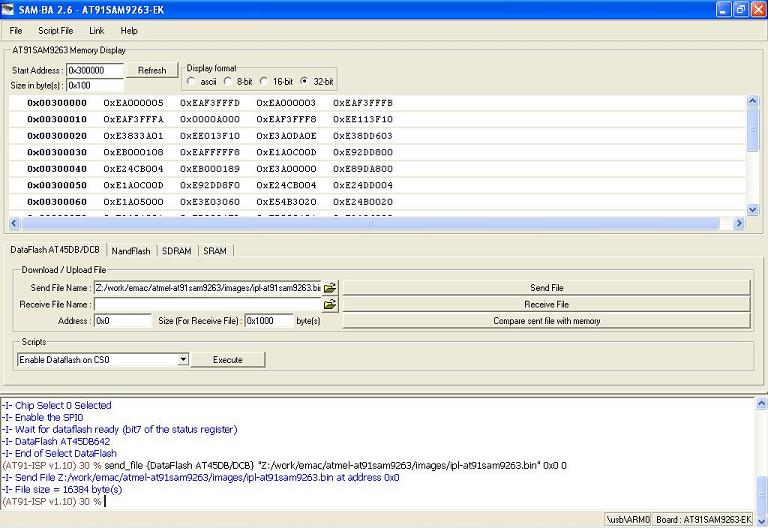
mkflashimage script creates a combined IPL/IFS image as ipl-ifs-at91sam9263.bin
The mkflashimage script:

#!/bin/sh
# script to build a binary IPL and boot image for ATMEL AT91SAM9263 Evaluation Kit board.
# NOTE the image (ipl-ifs-at91sam9263.bin) must be built as binary, i.e. [virtual=armle,binary] in the buildfile
set -v

#       Convert IPL into BINARY format
${QNX_HOST}/usr/bin/ntoarm-objcopy --input-format=elf32-littlearm --output-format=binary -R.data ../install/armle/boot/sys/ipl-at91sam9263 ipl-tmp-at91sam9263.bin

#       Pad BINARY IPL
mkrec -s16k -ffull -r ipl-tmp-at91sam9263.bin > ipl-at91sam9263.bin

#       Combine the BINARY IPL with the BINARY OS Image
cat ./ipl-at91sam9263.bin ./ifs-at91sam9263.bin > ipl-ifs-at91sam9263.bin

#       Cleaning up temporary files
rm -f *tmp*
1. Install "AT91-ISP v1.12.exe" .
2. Intall "ActiveTcl8.5.5.0.287690-win32-ix86-threaded.exe" i.e.TCL environment which is used by SAM-BA (any other TCL environment can also be used) .
3. Connect serial cable with windows machine, and use any serial port application such as teraterm or hyperterminal, and attach it with COM device, with baud rate set as 115200. Make sure the Atmel Data-Flash card is not pluged in the socket A.
4. Restart the board, hyperterminal will be showing following message .
RomBOOT
>
5. Connect usb cable with windows machine, It will prompt with a new usb hardware found message, and will try to install the corresponding driver.
6. Check device has enumerated properly by looking into device manager .
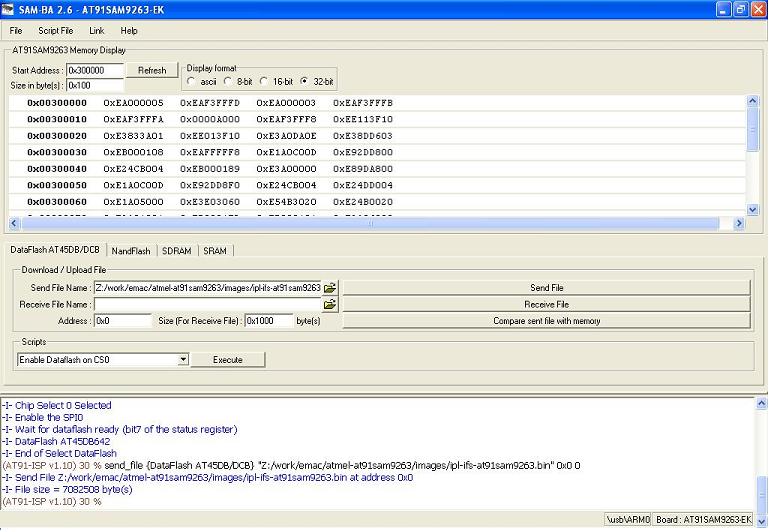
7. Start SAM-BA 2.6 with \usb\ARM0 as connection.
RomBOOT
>

QNX Neutrino Initial Program Loader for ATMEL AT91SAM9263-EK
Commands:
Press 'D' to download an OS image from serial port, using sendnto utility
Press 'F' to Boot an OS image from SPI/SERIAL flash
ATMEL AT45DB642D/AT45DCB008D SPI Flash detected.

QNX IFS image detected on page: 00000010 Offset: 00000220 Size: 0057E240
######################################################Done
found image, calling image setup...
image_setup OK, calling image start...


PIO init : DBGU, USART, Audio(AC97), NAND: TO DO,
CPU0: Dcache: 512x32 WB
CPU0: Icache: 512x32
CPU0: 41069265: arm926 rev 5 100MHz
elf_map: 1M va=fe000000 pa=20100000 sz=00100000
elf_map: 1M va=fe000000 pa=20100000 sz=00100000
Header size=0x0000009c, Total Size=0x000004e0, #Cpu=1, Type=4
Section:system_private offset:0x000001f0 size:0x00000068
  syspage ptr user:fc404000 kernel:fc404000
  cpupage ptr user:fc4047e0 kernel:fc4047e0 spacing:84
  kdebug info:00000000 callback:00000000
  boot pgms: idx=0
    0) base paddr:20110000 start addr:fe03d838
  ramsize:00000000 pagesize:00001000
Section:qtime offset:0x00000148 size:0x00000060
  boot:00000000 CPS:00000000002faf08 rate/scale:320000000/-15 intr:1
Section:callout offset:0x000000a0 size:0x00000048
  reboot:fc404658 power:fc404678
  timer_load:fc40468c reload:fc4046b4 value:fc4046e0
  0) display:fc404700 poll:fc404724 break:fc404748
  1) display:00000000 poll:00000000 break:00000000
Section:cpuinfo offset:0x000001a8 size:0x00000020
  0) cpu:41069265 flags:40000000 speed:00000064 cache i/d:1/0 name:53
Section:cacheattr offset:0x000004a0 size:0x00000040
  0) flags:32 size:0020 #lines:0200 control:fc4044e0 next:255
  1) flags:11 size:0020 #lines:0200 control:fc404534 next:255
Section:meminfo offset:0x000004e0 size:0x00000000
Section:asinfo offset:0x00000320 size:0x00000140
  0000) 0000000000000000-00000000ffffffff o:ffff a:0010 p:100 c:00000000 n:21
  0020) 0000000020000000-0000000023ffffff o:0000 a:0017 p:100 c:00000000 n:28
  0040) 0000000000000000-00000000ffffffff o:ffff a:0010 p:100 c:00000000 n:21
  0060) 0000000020000000-0000000023ffffff o:0040 a:0007 p:100 c:00000000 n:32
  0080) 000000002010e108-000000002067e23f o:0000 a:0005 p:100 c:00000000 n:60
  00a0) 0000000020100000-000000002010e107 o:0000 a:0007 p:100 c:00000000 n:68
  00c0) 000000002010e108-000000002067e23f o:0000 a:0007 p:100 c:00000000 n:76
  00e0) 0000000020000000-0000000020007fff o:0020 a:0007 p:100 c:00000000 n:84
  0100) 0000000020010834-00000000200fffff o:0020 a:0007 p:100 c:00000000 n:84
  0120) 000000002067e240-0000000023ffffff o:0020 a:0007 p:100 c:00000000 n:84
Section:hwinfo offset:0x000002d8 size:0x00000048
  0) size:3 tag:3 isize:3, iname:0, owner:65535, kids:1
  12) size:3 tag:17 isize:3, iname:9, owner:0, kids:1
  24) size:3 tag:3 isize:3, iname:37, owner:12, kids:1
  36) size:4 tag:46 isize:4, iname:41, owner:24, kids:0
     00 00 00 00
Section:typed_strings offset:0x00000258 size:0x00000020
  off:0 type:5 string:'UNKNOWN'
  off:12 type:2 string:'localhost'
Section:strings offset:0x00000278 size:0x00000060
  [0]'hw' [3]'Group' [9]'unknown' [17]'Bus' [21]'memory' [28]'ram' [32]'1to1'
  [37]'rtc' [41]'NONE' [46]'Device' [53]'arm926' [60]'imagefs' [68]'startup'
  [76]'bootram' [84]'sysram'
Section:intrinfo offset:0x00000460 size:0x00000040
  0) vector_base:00000000, #vectors:32, cascade_vector:7fffffff
     cpu_intr_base:00000000, cpu_intr_stride:0, flags:0000
      id => flags:8000, size:002c, rtn:fc4045a0
     eoi => flags:9000, size:0028, rtn:fc4045cc
     mask:fc4045f4, unmask:fc404618, config:00000000
Section:smp offset:0x000004e0 size:0x00000000
Section:pminfo offset:0x000004e0 size:0x00000000
Section:mdriver offset:0x000004e0 size:0x00000000
Section:boxinfo offset:0x000001c8 size:0x00000028
  hw_flags:00000000
Section:cpu offset:0x00000128 size:0x00000020
  page_flush:fc404564 page_flush_deferred:fc40459c
  upte_ro:00000aae upte_rw:00000ffe
  kpte_ro:0000000e kpte_rw:0000055e
  mask_nc:0000000c
  mmu_cr1:00051078 set:0000317f clr:00000000 -> 0005317f

System page at phys:20010000 user:fc404000 kern:fc404000
Starting next program at vfe03d838
cpu_startnext: cpu0 -> fe03d838
Welcome to QNX Neutrino 6.4 on the Atmel AT91SAM9263 Board
Starting DBGU driver...
Starting Serial USART 1 driver ...
Starting SPI driver...
Starting Audio driver...
Starting Graphics driver...
Starting NAND driver...
#

You can test the OS simply by executing any shell builtin command or any command residing within the OS image (e.g. ls).
In case if Board is new or IPL gets corrupted, We can reprogram IPL using SAM-BA application.
The driver command lines below are specific to the Atmel AT91SAM9263 board. See the online docs for each driver for additional command-line options and other details.
Note: Some of the following drivers are commented out in the default buildfile. To use the drivers in the target hardware, you'll need to uncomment them in your buildfile, rebuild the image, and load the image into the board.
startup-at91sam9263 -r 0x23d00000,0x200000,1 -vvvvvvv
devc-serusart -F -S -u2 -b115200 -c50000000 0xfff8c000^2,7Required binaries:
devc-serdebug -e -F -S -b115200 -c50000000 0xffffee00,1Required binaries:
spi-master -u0 -d at91sam9xx base=0xFFFA4000,irq=14,clock=50000000
spi-master -u1 -d at91sam9xx base=0xFFFA8000,irq=15,clock=50000000Required binaries:
io-pkt-v4 -dat91sam9xx syspageRequired binaries:
io-audio -d at91sam9xx_ac97 ioport=0xfffa0000,irq=18Required binaries:
devb-mmcsd-at91sam9xx mmcsd ioport=0xFFF80000,irq=10Required binaries:
i2c-at91sam9xx -p0xfff88000 -i13 -vRequired binaries:
fs-etfs-at91sam9xx -D addr=0x40000000,board_id=at91sam9263-ek -m /fs/etfsRequired binaries:
    Photon &
    waitfor /dev/photon
    io-display -dvid=0x0,did=0x0
    io-graphics
    pwm &
    pterm -x10 -y10 -h250 -w200 -t"QNX 6.4.0" -K 03 &
    devc-pty &
Required binaries:
| HW Format | QNX Format | Notes |
|---|---|---|
| 16-bit | 15-bit | QNX framework format is ARGB1555, but MSB is not actually used because the hardware uses only 15 bits |
startup-at91sam9263 -r 0x23d00000,0x200000,1 -vvvvvvv
where 0x23d00000 is the physical base address of memory (1MB aligned), and 0x200000 is the size of memory reserved in bytes.
For a list of options available to the driver please see the at91sam9263.conf file.